Support Centre

Find all the answers to your question

League Manager Update – 2 October 2018

We are pleased to announce an update to League Manager, which is scheduled for the evening of Tuesday 2 October.

You can view a summary of the key changes via the release article below:

Please note on Tuesday 2 October League Manager will be unavailable between 11:00pm and 4:00am AEST (Wednesday 3 October) for the scheduled release.

If you have any questions please don’t hesitate to contact our team on 1800 PLAY TENNIS (752 983), [email protected] or through our Live Chat function.

MyTennis Update – 09 July 2018

We are pleased to announce the release of a MyTennis enhancement in relation to the Family/Related membership packages.

We have been working hard to ensure that all family members signing up to a family membership package experience a smooth and easy process.


For Club Administrators requiring help on how this feature is used, please visit the below support site article;

https://support.tennis.com.au/articles/adding-family-members-club-administrator-level/


For Tennis Members requiring help on how to process their family membership, please see below;

https://support.tennis.com.au/articles/purchasing-a-family-membership-package-online/

League Manager Update – 4 May 2018

League Manager Update – 4 May 2018

We are pleased to announce an update to League Manager’s support functionality, with the launch of the WalkMe support tool.

WalkMe provides League Manager Users with step-by-step instructions to assist users in completing specific League Manager tasks.

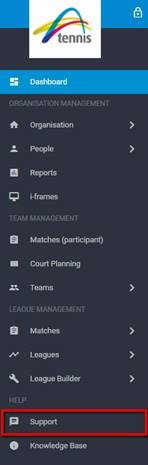
To access WalkMe, click ‘Support’ on the League Manager dashboard.


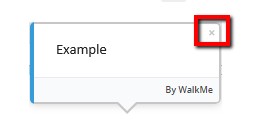
Users can exit the WalkMe support tool at any time when in use by simply clicking the ‘x’ on the WalkMe pop-up.

The WalkMe support tool can currently assist users with:

  • Entering Match Results
  • Incomplete Rubbers/Matches
  • Disputing Results
  • Printing Scorecards
  • Viewing Ladders
  • Ladder Adjustments
  • Editing Match Settings
  • Activating Finals
  • Adding a Club Logo

The team at Tennis Australia will continue to update WalkMe with additional guides for various League Manager functions throughout 2018.

Summary of League Manager improvements/changes:

  • Users can access live support and WalkMe via the ‘Support’ button on the League Manager Dashboard.
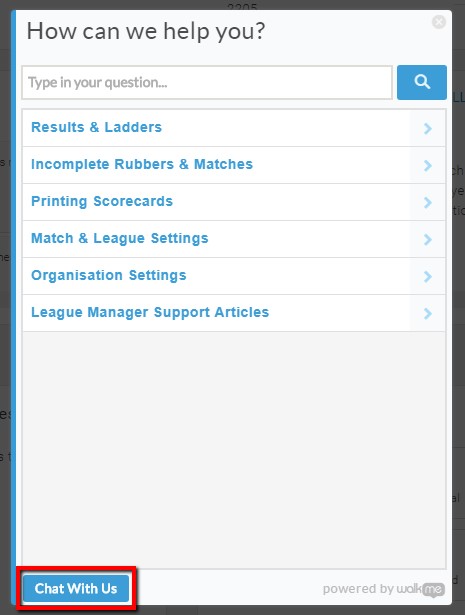
  • The Live Chat feature is now accessible by clicking the Support button, and clicking ‘Chat With Us’ on the pop-up menu:


       Please note that the ‘Chat With Us’ feature will only appear when our Customer Service Team is available to chat.

  • Users can access online step-by-step guidance via the Support button for key League Manager tasks
  • Access to Tennis’ Systems Support Centre is now available by clicking ‘Knowledge Base’ on the League Manager Dashboard.

In the instance WalkMe cannot assist with your task, you can still refer to Tennis’ Systems Support Centre or contact 1800 PLAY TENNIS (752 983), email [email protected] or get in touch via the Chat With Us function.

League Manager Update – 26 April 2018

We are pleased to announce an update to League Manager and Match Centre functionality.

League Manager:

  • Ability to view assigned courts for a match in Matches Overview and Matches Participant
  • Printed scorecards now display allocated courts for a match
  • Improved player search functionality when editing a squad/adding players to a team

A user guide for Adding Players to a Team in League Manager can be found HERE.

Match Centre:

  • Improved player search functionality when adding a players to a team via the scorecard
  • Ability to view assigned court for a match on the scorecard
  • Printed scorecards now display allocated courts for a match

A user guide for Adding Players to a Team in Match Centre can be found HERE.


In addition to the improvements listed above, several general fixes included in the update to enhance.

If you have any questions, please don’t hesitate to contact our team on 1800 PLAY TENNIS (752 983), [email protected] or through our Live Chat function.

My Tennis Outage – 20th November 2017

There will be a scheduled outage on the 21st November 2017 between 12am-4am (AEDT) which will restrict administrators from logging in to My Tennis.

We apologise for any inconvenience this may cause and if you have any questions, please don’t hesitate to contact our friendly team on 1800 PLAY TENNIS (752 983), [email protected] or through our Live Chat function.

My Tennis Update – 30 August 2017

Please be aware the edit button that previously existed when a membership was pending has now been removed.

Club administrators can still approve or reject a membership that is pending.

If any changes need to be made to a membership that is pending, the membership will need to be rejected and re-entered with the correct information.

For further details on how to add members and memberships please see the user guide by clicking here.

If you have any questions, please do not hesitate to contact our friendly team on 1800 PLAY TENNIS (1800 752 983), [email protected], through our Live Chat function, or alternatively your Participation Leader.

My Tennis Update – 14 July 2017

We are pleased to announce that the Create Tennis Account template is now available in the Email Communication Tool. The template allows you to invite your members to create a tennis account, which will simplify your membership renewals.

For further details on how to use the Create Tennis Account template please click here. 

If you have any questions, please don’t hesitate to contact our friendly team on 1800 PLAY TENNIS (752 983), [email protected], through our Live Chat function or alternatively your Participation Leader.

League Manager Update – Tuesday 11 July 2017

League Manager Update – Tuesday 11 July 2017

We’re pleased to announce a number of updates to League Manager and Match Centre.


League Manager New Functionality:

  • Delete Scheduled Matches
  • Add Rounds to Divisions (No longer requires each match to be manually added one by one)
  • Delete Rounds from Divisions (provided no results have been entered)
  • Run a Facility Planning (Court Availability) Report
  • See an Activate Finals Prompt once all match results for a division have been entered
  • Generate a Draw Seeds Report during the League Builder process

League Manager improvements/changes:

  • See player types (e.g. Base, Reserve, Team Manager) on the League Squad Overview report
  • Filter Teams on the Teams Overview page by League Status as well as League & Facility
  • Select odd numbers in the age restriction settings when creating a League (E.g. 11&Under, 13&Over)
  • View Child organisations that are linked to your Organisation
  • Organisation Logo (if uploaded) will now appear on download/print scorecard option
  • Increased Filter options within the Reports section


Match Centre New Functionality:

  • Team Search results will now display the League and Division in which that team is competing in as well as the Organisation and State.
  • When adding a player to a match, the search results will now display the players meeting your search criteria along with the Organisations they are linked too
  • Ability to reset the pre-filled player selections per player
  • Out of Time option has been added when marking a match as Not Played/Incomplete


If you require more information or assistance at any time please call 1800 PLAY TENNIS, email [email protected] or get in touch via the Live Chat function available in League Manager and Match Centre


TennisConnect Rewards Close – 1 June 2017

The 2016/17 Rewards period has now closed.

All payments will be processed by 31 July 2017. Clubs eligible to receive a reward will be sent further information regarding payment over the coming weeks.

If you have any questions, please don’t hesitate to contact our friendly team on 1800 PLAY TENNIS (752 983), [email protected] or through our Live Chat function or alternatively your Participation Leader.